
audience analyzer
Find your best-performing audiences
LinkedIn provides demographic data
for every campaign.
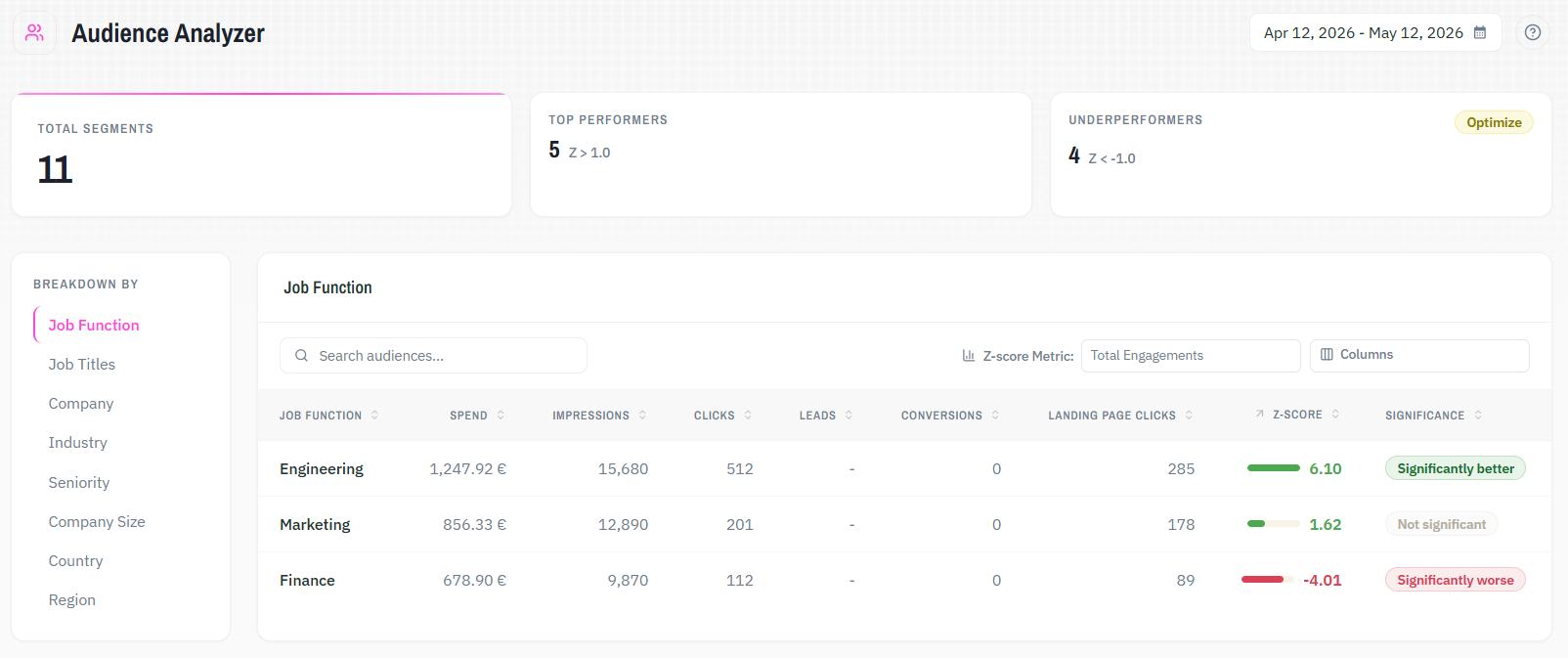
Qova Audience Analyzer is a LinkedIn Ads analytics tool. It applies z-score analysis to your LinkedIn campaign data and shows which audience segments genuinely outperform your average. Results rank across eight dimensions by statistical significance. You exclude underperforming segments directly in LinkedIn targeting, from the same view.
Audience Analyzer.
01
Consistent patterns become visible
Strong segments stop hiding inside individual campaign reports. You see which job functions, industries, and seniorities outperform your average across your full account, ranked by statistical strength, not volume or recency.
02
Budget drain stops going unnoticed
Underperforming segments are flagged and ranked by significance. You know which ones are spending without delivering before the pattern compounds. In single campaign mode, exclusions apply directly to LinkedIn targeting. The segment stops receiving impressions immediately.
03
Targeting decisions become data-driven
The same audience data reads differently depending on which dimension you examine. Switching between seniority, company size, region, and industry shows where performance differences actually live, and where your current targeting holds up.
The logic behind the analysis.
Scope shapes what the data answers
Account-level analysis surfaces trends across all campaigns. Narrowing to a single campaign shifts the question and opens the door to direct action on what you find within LinkedIn targeting.
Dimensions reveal different signals
Job function reveals one pattern. Seniority reveals another. Switching dimensions is how meaningful differences emerge from data that looks flat at first glance.
Z-scores measure deviation, not volume
Every segment is scored against your overall audience rate. Significance badges translate that into plain language, from High performer to Highly significant underperformer, so sorting by signal strength replaces sorting by spend or impressions.
Action follows the finding directly
High performers show where increased investment is warranted. Significant underperformers with real spend are clear exclusion candidates. That exclusion applies to LinkedIn immediately. The change requires no export or manual update.
Built for precision, not approximation.
Eight breakdown dimensions
Analyze performance by job function, job title, seniority, company, industry, company size, country, or region.
Auto-detection of the right metric
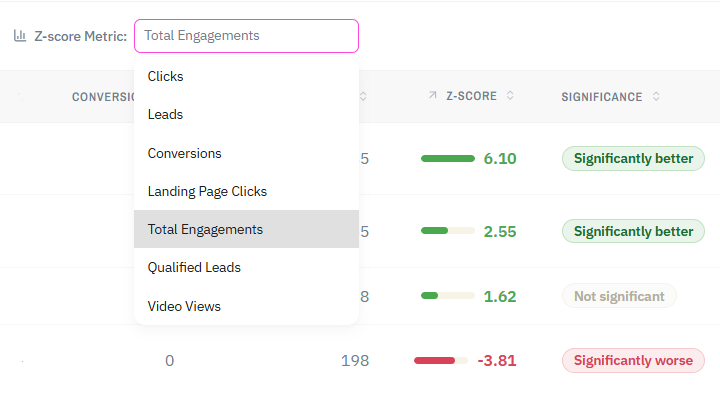
Audience Analyzer automatically detects the campaign objective and sets the z-score metric. You can override the selection at any time.
Configurable metric columns
Choose which columns appear in your table. Spend, impressions, CTR, CPC, conversions, and more. The z-score calculation stays the same.
Statistical significance, not surface metrics
Z-scores measure how far a segment deviates from your overall audience rate. Significance badges translate that into clear labels, from High performer to Highly significant underperformer.
Exclusions that take effect immediately
Available in single campaign mode. Confirmed exclusions apply directly to your LinkedIn campaign targeting. Excluded segments are marked in the table.
Combine with,
Funnel Insights.
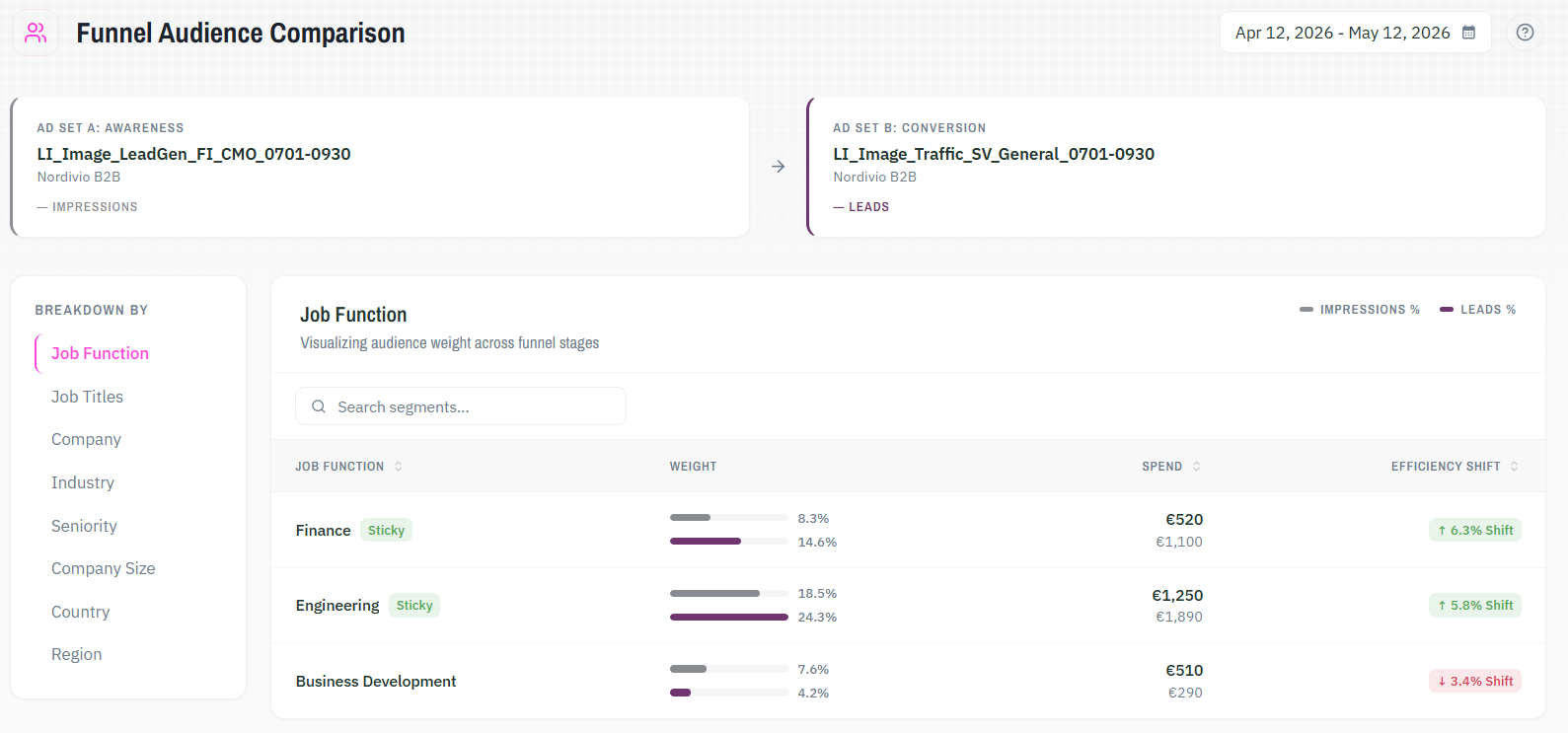
Audience Analyzer shows which segments perform best within your current campaigns. Funnel Insights shows whether those segments follow through from engagement to lead across your full funnel. Use both to see the complete picture of who your best buyers actually are.
See what your LinkedIn Ads data actually tells you.
Try it with your own data. All solutions are included from the start.